---
title: Meet Metaphor
sidebar:
label: Meet Metaphor
order: 0
---
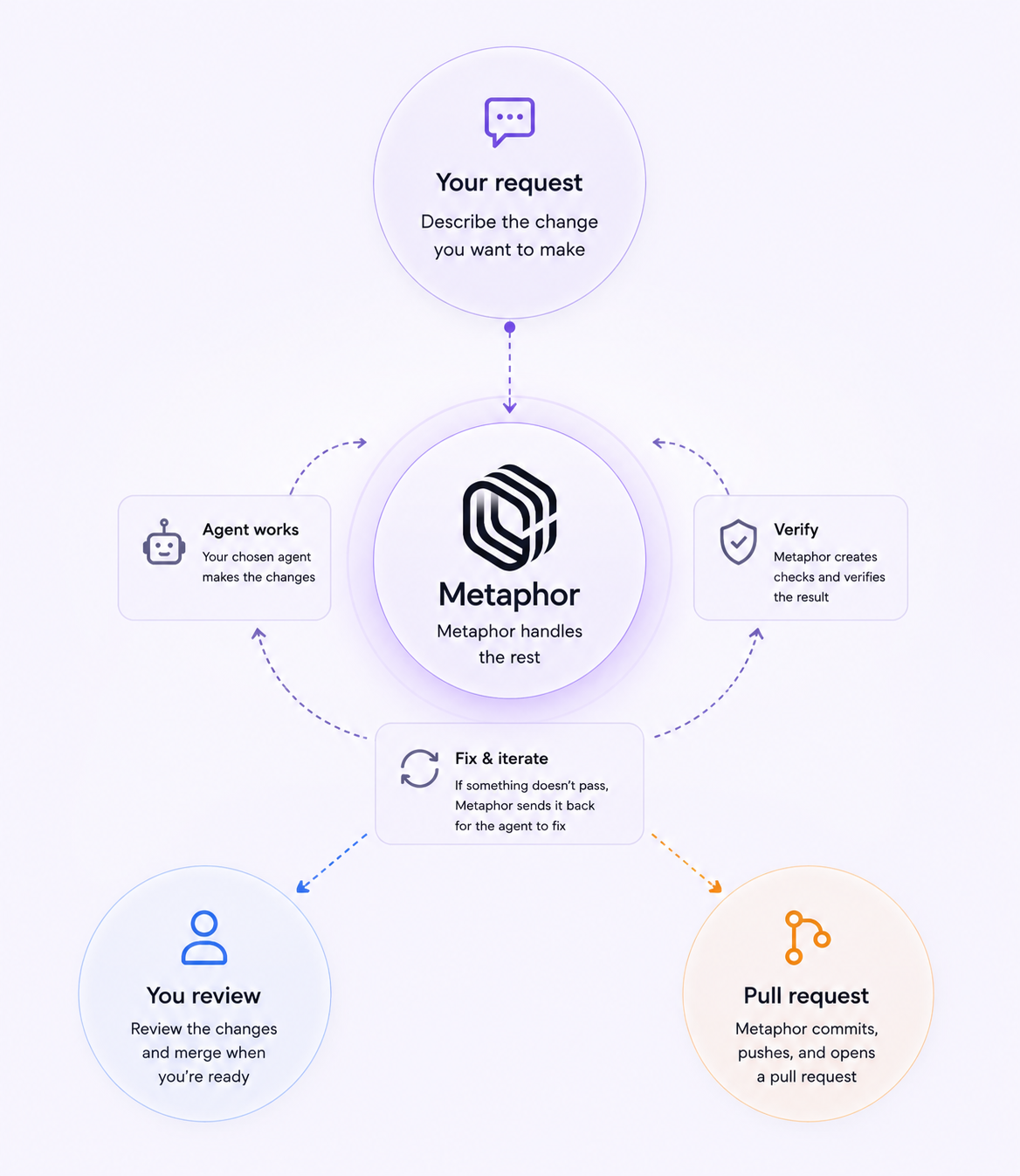
Metaphor coordinates coding agents like Claude Code and Codex to take a task from a prompt to a pull request.
Choose a repository and agent, then describe what you want to change. Metaphor gives the task an isolated place to work, runs the agent, tracks its changes, verifies the result, and can prepare the pull request for you.
You can follow along and step in when you want to — without managing every step yourself.
## Start with one change
Try a small task in a project you know:
> Add the ability to mark a task as important. Important tasks should appear at the top of the list.
With Handoff on, that's enough to get started. Metaphor runs your chosen agent, verifies the result, and takes the finished work through to a pull request.
You can follow along and step in at any point, but you don't need to manage each step yourself.
 ## Work on more than one thing
Every task gets its own Git worktree automatically.
One agent can fix a bug while another works on a feature in the same repository without mixing their unfinished changes. You don't need to create worktrees or switch between them yourself.
You can still open a task's worktree locally when you want to run, test, or modify the changes yourself.
Learn more about [Worktrees](/worktree).
## Use the agents you already know
Metaphor works with coding agents installed on your machine, including Claude Code and Codex.
You choose which agent runs a task and continue using the agent CLIs and subscriptions you already have. You can also switch agents during a task without starting the work over.
Learn more about [Agents](/agents).
## Verify before handing off
Metaphor creates checks from your task and verifies the agent's work against them.
If a check fails, Metaphor can send the relevant context back to the agent so it can continue working. You can also add your own checks when you want a specific requirement verified.
Learn more about [Checks](/checks).
## Hand off the finished work
Turn on Handoff when you want Metaphor to take verified agent work through to a pull request.
Metaphor commits the changes, pushes the branch, and creates the pull request. You can follow the work as it happens, then review and merge when you're ready.
Learn more about [Handoff](/handoff).
## Carry context into future work
Metaphor builds project knowledge from merged pull requests. Later tasks can use that context to follow your project's patterns and previous decisions.
## Try your first task
Install Metaphor, connect a repository, and give an agent a small change you can easily review.
Download Metaphor for macOS and connect GitHub.
Give Metaphor a task and follow it to a pull request.
Set up and work with your coding agents.
Find answers to common questions about Metaphor.
## Work on more than one thing
Every task gets its own Git worktree automatically.
One agent can fix a bug while another works on a feature in the same repository without mixing their unfinished changes. You don't need to create worktrees or switch between them yourself.
You can still open a task's worktree locally when you want to run, test, or modify the changes yourself.
Learn more about [Worktrees](/worktree).
## Use the agents you already know
Metaphor works with coding agents installed on your machine, including Claude Code and Codex.
You choose which agent runs a task and continue using the agent CLIs and subscriptions you already have. You can also switch agents during a task without starting the work over.
Learn more about [Agents](/agents).
## Verify before handing off
Metaphor creates checks from your task and verifies the agent's work against them.
If a check fails, Metaphor can send the relevant context back to the agent so it can continue working. You can also add your own checks when you want a specific requirement verified.
Learn more about [Checks](/checks).
## Hand off the finished work
Turn on Handoff when you want Metaphor to take verified agent work through to a pull request.
Metaphor commits the changes, pushes the branch, and creates the pull request. You can follow the work as it happens, then review and merge when you're ready.
Learn more about [Handoff](/handoff).
## Carry context into future work
Metaphor builds project knowledge from merged pull requests. Later tasks can use that context to follow your project's patterns and previous decisions.
## Try your first task
Install Metaphor, connect a repository, and give an agent a small change you can easily review.
Download Metaphor for macOS and connect GitHub.
Give Metaphor a task and follow it to a pull request.
Set up and work with your coding agents.
Find answers to common questions about Metaphor.